


Caesars Rewards Resort Offers
4.68.61K Reviews
App Specs
- Version
- 9.10.4
- Updated On
- License
- Free
- Downloads
- 1,000,000+
- Developer
- Caesars Entertainment
- Categories
- Travel & Local
- Platform
- Android, iOS
Screenshots
 Analysis by AppCompare
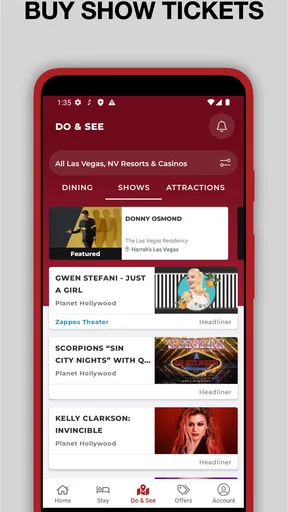
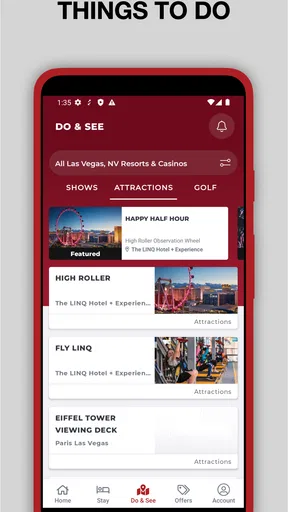
If you are planning a casino resort trip and want one place to explore Caesars properties, offers, and Rewards information, Caesars Rewards Resort Offers is a practical starting point. I found it most useful as a trip-planning companion rather than as a complete travel agency replacement. It brings Caesars Entertainment’s resort-focused information into a mobile app, covering destinations such as Las Vegas, Atlantic City, New Orleans, and other locations, while also connecting the experience to the Caesars Rewards program.
The app is free to download, carries a Mature 17+ rating, and belongs to the Travel & Local category. That age classification matters because the service is closely associated with casino resorts and gambling destinations, so it is not an app I would recommend casually to children or anyone looking for a general hotel-booking tool. For the right traveler, though, it can make the early stages of a Caesars trip easier to organize.
In my experience, the best way to approach Caesars Rewards Resort Offers is to treat it as a destination-specific planning tool. I would install it before choosing a resort, browse the available destination information, check what is relevant to my trip, and only then decide whether I need the broader Caesars Rewards features. That order keeps the first session simple and avoids getting lost in account details before knowing what I actually want to do.
What to expect when you open the app
The app is developed by Caesars Entertainment, and its focus is clear from the first use: helping people interact with the company’s resort ecosystem through a phone. It is not designed like a general map app, a standalone flight search service, or an independent hotel comparison site. Instead, it makes the most sense for someone considering a Caesars destination or already staying at one.
The large user base suggests that the app has become a familiar tool for this audience, with more than a million installs and an average rating of 4.6 from roughly 53 thousand ratings. Those figures do not guarantee that every screen will suit every traveler, but they do indicate that the app has found a substantial audience among Caesars guests and Rewards members.
I would set expectations carefully. A resort app can be valuable because it keeps property-specific information close at hand, but it may feel narrower than a broad travel platform. If you want to compare every hotel in a city, find independent restaurants, or build an entire itinerary across unrelated companies, a general travel app will usually be more flexible. Caesars Rewards Resort Offers is stronger when your plans already involve Caesars properties.
That distinction is especially important for first-time visitors. You do not need to understand every part of the Caesars ecosystem before opening the app. Start with one practical question: am I looking for a resort destination, checking an offer, or managing a Rewards relationship? Keeping that goal in mind makes the app less intimidating and helps you recognize which information matters to you.
Worth Reading Before You Choose

EA SPORTS FC Mobile 26 Is a Bigger Football Game, but It Takes Time

Flipboard Shows What News Apps Must Do Beyond the Feed

Switching to Android Auto Means Rethinking Your Driving Routine

Google Calendar Makes a Crowded Week Easier to Manage

Ludo King Makes the Most of the Minutes Between Plans

Baby Panda World Brings Quick Play to Modern Phones, but Its Game Library Feels Busy
Who will get the most from it
I think the app is a good fit for three kinds of users. The first is someone comparing Caesars destinations before a trip. The second is an existing Rewards member who wants a mobile way to stay connected with Caesars properties. The third is a repeat visitor who would rather use a dedicated resort app than search through a browser every time.
It is less suitable for a traveler who has not decided whether to visit a casino resort at all. In that situation, the app’s Caesars-centered approach may be too specific. I would first use a general travel service to compare neighborhoods, transport, independent hotels, and non-Caesars attractions, then turn to this app if a Caesars property becomes part of the plan.
It is also not the right choice for anyone who wants a neutral overview of gambling destinations. Because the app comes from Caesars Entertainment, its information is naturally centered on that company’s resorts and Rewards environment. That is useful for a Caesars customer, but it should not be mistaken for an impartial city guide.
Getting from installation to a useful first session
I find the first session works best when I arrive with one question instead of treating the app as a tour of every section. I’d choose a destination I’m genuinely considering, note what I need to decide, and use that goal to separate useful resort details from general browsing. That makes the setup feel purposeful and gives me a clear point to check in the next section.
Keep the first setup focused
After installing the app, I recommend resisting the urge to explore every available option immediately. First decide whether your priority is a destination, a resort offer, or Rewards access. A narrow goal gives you a clear test: by the end of the first session, you should have found something that helps you plan or decide, rather than simply having tapped through several menus.
The app runs on devices using at least iOS or Android version 10, which covers many established phones while still making the operating-system requirement worth checking before installation. If your device is older, confirming compatibility first can save time. On a supported phone, I would also make sure the app has enough room to open comfortably and that I can give myself a few uninterrupted minutes for the initial exploration.
One useful habit is to keep your trip details nearby without entering anything impulsively. Know the destination you are considering, the approximate timing of your visit, and whether you already use Caesars Rewards. This preparation helps you judge the usefulness of what you see. It also prevents a common mistake: treating every visible offer as automatically relevant without checking whether it matches your actual travel plans.
If you are already a Rewards member, signing in can make the app more personally relevant, but I would still begin by understanding the destination sections. That way, the account is supporting a travel decision rather than becoming the entire purpose of the first visit. If you are new to the program, take your time reading what each area is for before committing to a workflow you do not yet understand.
Finding the first meaningful result
Your first successful action should be concrete. For example, choose a Caesars destination you are genuinely considering, inspect the related resort information, and identify an offer or planning detail that affects your decision. That is more useful than merely opening the app and confirming that it contains several properties.
I would use a simple three-step routine. First, select the place that matches your intended trip. Second, separate information that helps you choose a resort from information that is only useful after booking. Third, save the relevant details in your own travel notes or calendar so the app is not the only place where your plan exists. This last step is easy to overlook, but it gives you a backup when you are moving between apps or traveling with other people.
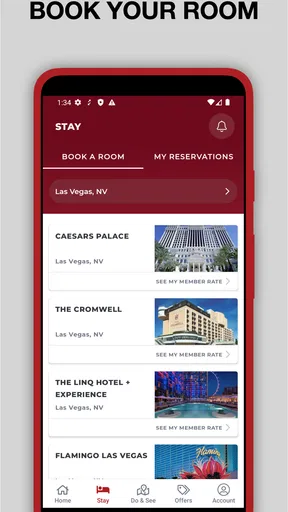
A realistic example would be a first-time visitor comparing a Las Vegas stay with an Atlantic City trip. I would open the destination that fits the planned journey, review the available resort-related material, and then compare the practical implications with what I already know about transport, dates, and the rest of the itinerary. The app can narrow the Caesars side of the decision, while a general travel tool handles the wider city comparison.
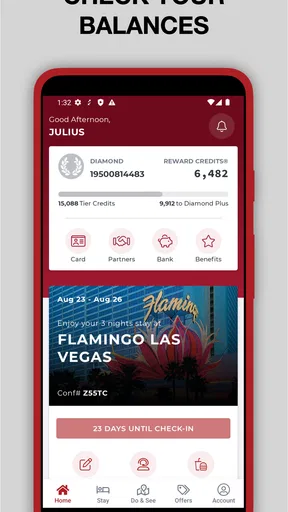
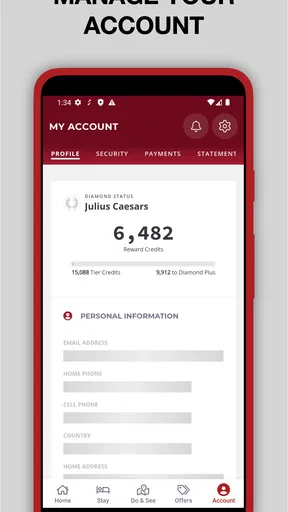
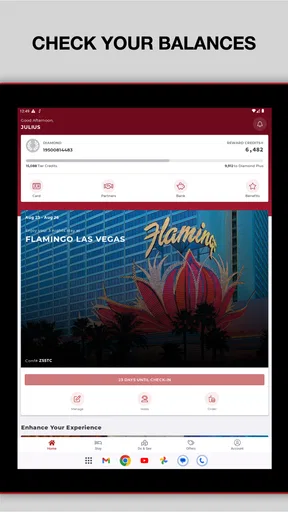
For an existing Rewards member, the first success might look different. Instead of browsing destinations, I would check the account-related area and then connect what I see with an upcoming stay. The important point is to use the app to answer a real question, such as whether a resort or offer deserves further attention, rather than treating the Rewards balance or account screen as something to inspect without a purpose.
How to judge offers without rushing
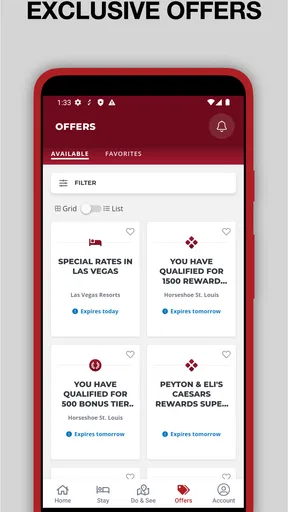
The word “offers” can make people focus on the most attractive headline and overlook the conditions that determine whether it is useful. My advice is to read an offer as part of a complete trip. Consider the destination, the dates you can actually travel, the resort you would choose, and any restrictions or requirements shown in the app before deciding that the offer represents a saving for you.
This is one of the app’s less obvious trade-offs. A dedicated resort app can put relevant promotions in front of you more efficiently than a general travel search, but that convenience can also encourage quick decisions. I would never change my destination solely because an offer looks appealing on the first screen. Compare the total travel plan, not just the promotional wording.
Another useful approach is to check the app again when your plans change. An offer that is irrelevant for a weekend trip may matter for a longer visit, while a property that looked convenient before you checked transport may no longer be the best choice. The app is most helpful when it supports an ongoing decision, not when it is treated as a one-time coupon folder.
Where first-time users may become confused
The main stumbling point, in my view, is recognizing whether a screen is meant to help with a resort choice or with a Caesars Rewards relationship. I’d pause at each unfamiliar label and ask what decision it supports before moving on; that small habit can prevent account-related material from feeling like a requirement when I’m only comparing destinations. The next section looks at how that distinction plays out in practice.
Resort information and Rewards information are different jobs
The biggest potential confusion is assuming that every part of the app serves the same purpose. Resort offers help with destination and property decisions, while Rewards-related areas concern your relationship with the Caesars program. These subjects are connected, but they are not identical.
If you are simply trying to decide where to stay, begin with the resort and destination material. If you are checking an existing member relationship, move to the Rewards side. Separating those tasks keeps the interface easier to understand and prevents you from judging the entire app based on a section you did not actually need.
I also recommend reading labels carefully before acting on account-related information. A first-time user may expect a resort app to behave like a hotel booking service, while a Rewards member may expect every screen to show personal benefits immediately. Neither assumption is especially helpful. Give each section a clear purpose and evaluate it according to that purpose.
Do not confuse a dedicated resort tool with a complete itinerary planner
Caesars Rewards Resort Offers can be part of a travel workflow, but I would not make it the only app on my phone for a complex trip. It is not a replacement for transport planning, independent restaurant research, city maps, or comparing unrelated hotels. Its advantage is concentration: Caesars-related information is easier to find when Caesars is already central to the trip.
My preferred workflow is to use a general travel service for the broad outline, then use this app for Caesars-specific decisions. I might compare flight times, neighborhoods, and local activities elsewhere, then open the Caesars app to examine the resort side of the plan. This division of labor is more efficient than expecting one app to do everything, and it gives me a more balanced view of the trip.
The same principle applies to price comparisons. A resort offer may be relevant, but I would still compare the overall cost and convenience with alternatives. A lower room price is not automatically the better choice if the property makes the rest of the itinerary harder. The app helps me evaluate Caesars options; it does not remove the need for independent judgment.
Age rating and destination context deserve attention
The Mature 17+ rating is not a minor label to ignore. The app is tied to adult-oriented resort environments, and families should decide together whether it belongs on a younger traveler’s device. Even when the purpose is hotel planning, the surrounding destination context may not be appropriate for every audience.
I would also suggest setting a personal budget before browsing offers or Rewards-related opportunities. The app can make a resort visit feel organized and convenient, but convenience should not replace financial limits. Decide what you are comfortable spending on accommodation, food, entertainment, and gambling before the app becomes part of the decision-making process.
Practical ways to use it beyond the first visit
After the initial browse, I’d return when a real trip detail changes: a destination, timing, or the people traveling with me. I keep a brief note of the question I want answered, then use the app for the Caesars-specific part and another travel resource for the wider itinerary. That keeps repeat visits focused and helps me judge an offer by how well it fits the trip, not by its headline alone.
Use it as a pre-trip checklist
Once I know which destination I am considering, I would return to the app with a short checklist: confirm the relevant resort, review current offer information, check how the destination fits my Rewards plans, and record anything I need to remember. This turns a broad browsing experience into a repeatable routine.
A particularly useful habit is to take notes outside the app about why an offer matters. I might write down the intended travel dates, the resort I am comparing, and the question I still need to answer. That small step prevents me from reopening the app later and wondering why I saved or considered something.
For repeat visitors, the app can also act as a quick reference point between trips. Instead of starting from a blank browser search, I can return to a familiar Caesars-centered environment and then decide whether the current destination or offer deserves deeper research. The time saved is modest for one trip, but the workflow becomes more valuable when Caesars visits are a regular part of my travel.
Use a two-source check for important decisions
My strongest practical recommendation is to pair the app with an independent source whenever the decision affects the whole trip. Use the Caesars app for Caesars-specific information, then verify the wider context with a map, a general travel platform, or the official information for transport and local attractions. This is not because the app is ineffective; it is because a company-specific tool naturally shows only one side of a destination.
This two-source method is especially useful when traveling with people who have different priorities. One person may care about Rewards benefits, another about location, and another about non-casino activities. The app can support the first concern while other tools cover the rest. I find that approach more honest than presenting the Caesars option as automatically best for everyone in the group.
Know when to skip the app
I would skip this app if my trip does not involve Caesars Entertainment, if I am searching for independent accommodation, or if I want a neutral comparison across many resort companies. Installing it in those situations adds another specialized tool without solving the main problem.
I would also avoid relying on it as my sole source when the trip includes several cities, complicated transport, or a large group itinerary. A general planner will usually be better for coordinating those moving parts. The Caesars app becomes worthwhile when one of its destinations or properties is a meaningful part of the plan.
That honest limitation is also its main strength. The narrower the question, the more useful the app becomes. “Which Caesars destination and resort should I investigate?” is a good question for it. “How should I plan an entire holiday from departure to return?” is not.
My overall view after using it
Caesars Rewards Resort Offers is a focused Travel & Local app for people who are already considering Caesars destinations or who participate in Caesars Rewards. Its free price makes it easy to try, and the current version, 9.10.4, shows that it remains an actively maintained part of the company’s mobile offering. With a release history reaching back to February 17, 2014, it has also had time to become an established companion for this particular travel audience.
I like the app most when I use it with a clear purpose: choose a destination, inspect resort-related information, evaluate an offer in the context of a real trip, or connect an upcoming stay with Rewards activity. That focused approach produces a useful first result quickly and avoids the confusion that comes from trying to understand every feature at once.
My reservations are mainly about scope and judgment. It is not a neutral travel marketplace, not a full itinerary builder, and not a substitute for checking the wider cost and convenience of a trip. Offers still need careful reading, and a Caesars-centered view should be balanced with independent research. Those are manageable limitations as long as you know what the app is for.
With around 8.6 thousand written reviews alongside its strong average rating, the app clearly inspires enough engagement to be more than a rarely used resort brochure. Still, popularity should not decide whether it belongs on your phone. If Caesars is part of your travel plans, I would recommend trying it and using the destination-first workflow above. If it is not, I would spend that time with a broader travel alternative instead.
My final recommendation is straightforward: install it before a Caesars trip, begin with one destination, and aim for one concrete result during the first session. If the app helps you identify a suitable resort or understand an offer that fits your plans, it has earned its place in your travel toolkit. If your needs are broader than Caesars properties and Rewards, keep it as a specialist companion rather than making it the center of your entire trip.
Pros
- Exclusive hotel
- dining
- and entertainment deals for members.
- Personalized resort offers can make repeat visits more rewarding.
- Useful for comparing Caesars properties and available promotions.
- Rewards activity and offers are accessible in one place.
- Good option for travelers already visiting Caesars destinations.
Cons
- Offer availability may vary by location
- dates
- and membership tier.
- Some promotions include blackout dates or strict booking conditions.
- Rewards and offers can expire if not used within the stated period.
- Best value often requires spending at Caesars properties.
- The app may feel less useful for travelers outside Caesars destinations.
FAQs for Caesars Rewards Resort Offers
What is Caesars Rewards Resort Offers?
Caesars Rewards Resort Offers is a mobile experience designed for Caesars Rewards members who want to view and manage promotional hotel, dining, entertainment, and casino offers. After signing in, eligible users may see personalized deals connected to their account, along with details such as travel dates, participating properties, booking requirements, and expiration dates. The offers shown can vary significantly between members.
Do I need a Caesars Rewards account to use the app?
In most cases, you need a Caesars Rewards account or membership to access personalized resort offers. The app may require you to sign in with your membership credentials before displaying available promotions. If you are not already a member, you may need to register through Caesars’ official channels. Keep your login details secure and make sure the account information matches the details used for reservations.
Are the resort offers completely free, or do they include restrictions?
The offers are not necessarily completely free and commonly include terms and conditions. A complimentary room, reduced rate, dining credit, show ticket, or other benefit may require specific dates, a minimum stay, resort fees, taxes, deposits, or qualifying play. Some promotions are limited to selected properties and may exclude holidays or special events. Always read the complete offer rules before booking.
How can I redeem an offer shown in Caesars Rewards Resort Offers?
Redemption normally involves selecting an available promotion, reviewing its eligibility requirements, and following the booking or activation instructions provided in the app. Depending on the offer, you may be redirected to a Caesars booking page or asked to present your Rewards account at the property. Save confirmation details, check the expiration date, and verify that the reservation reflects the promotion before traveling.
Is Caesars Rewards Resort Offers available for every Caesars property and member?
No. Availability depends on your Caesars Rewards status, account history, location, promotional eligibility, property participation, and the dates you choose. Some members may receive more offers than others, while certain destinations or venues may not appear at all. Offers can also change without notice or become unavailable after reaching a booking limit, so the app should be treated as a personalized offers platform rather than a complete property directory.


